
Omnichannel Chat Version 3.40.0 Release
Release Date: September 5, 2025
Hi there,
We are excited to announce that Omnichannel Chat version 3.40.0 is now available! This new release brings an important update to the New Live Chat and several improvements aimed at enhancing performance and stability.
Starting September 5, 2025, you can fully experience the following updates:
Introducing the New Live Chat
Real-Time Builder
a. Old Version
Changes require saving to preview, which makes editing the live chat appearance slower for users
The old version is unstructured and less futuristic, it makes user not focus on customization
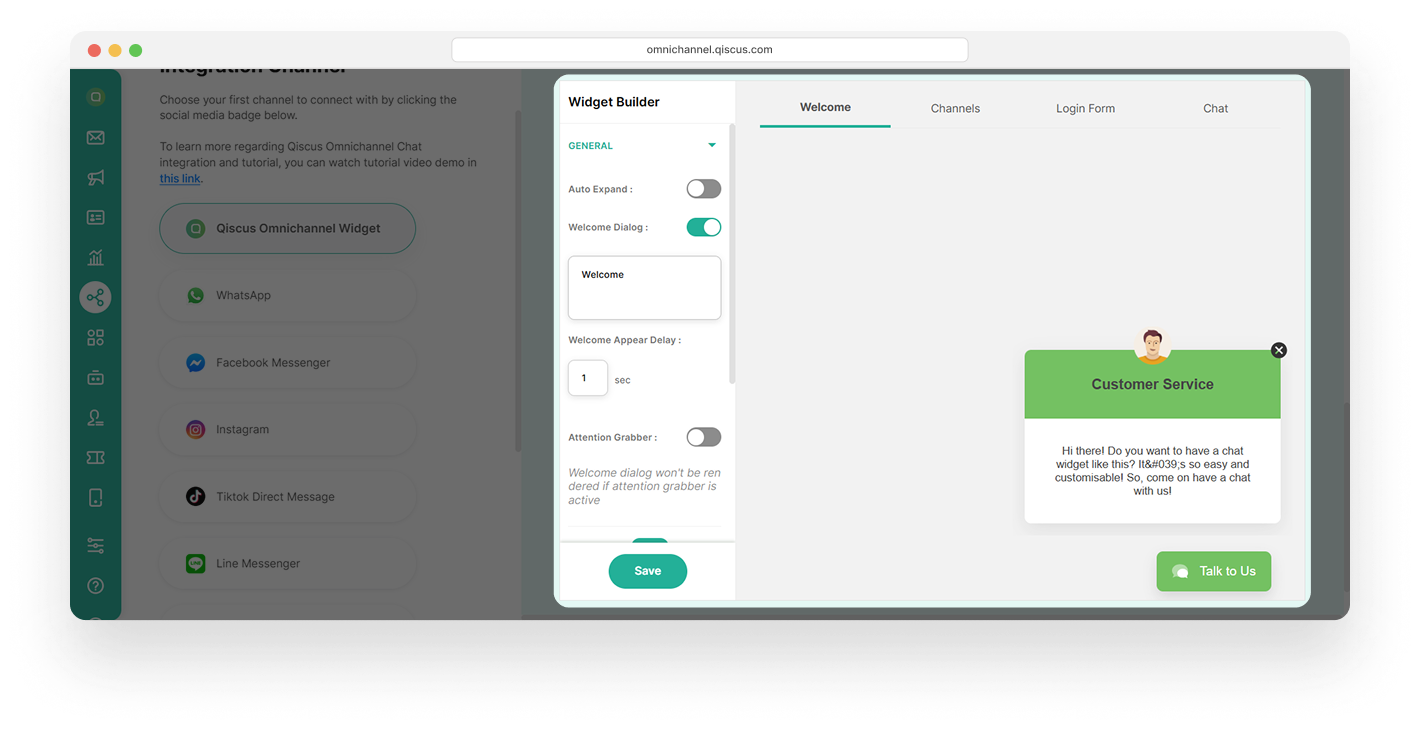 In Welcome Message, there are no significant changes; only the appearance has been updated to be more modern and consistent with other designs.

In the old version, the CTA button was placed in the navigation settings section. It makes user take extra steps and spend more time finding it before they can proceed.

In Channels, there are no significant changes; only the appearance has been updated to be more modern and consistent with other designs.

In Login Form, there are no significant changes; only the appearance has been updated to be more modern and consistent with other designs.

In Chat, it has a bubble-style appearance that directly guides the user to start a conversation using “Talk to Us” button. The attachment button is in the left side of chatbox and There is a timestamp when the message is sent

The color settings must be adjusted separately, which makes users spend more time changing the color appearance across the entire live chat.

b. New Version
Real-time preview without saving allows users to see changes instantly while editing the live chat appearance
More structured and futuristic, it makes user more focus on customization

In Welcome Message, there are no significant changes; only the appearance has been updated to be more modern and consistent with other designs.

In the new version CTA is placed in the menu’s category, which makes it easier for users to find and access it quickly.

In Channels, there are no significant changes; only the appearance has been updated to be more modern and consistent with other designs.

Login Form, there are no significant changes; only the appearance has been updated to be more modern and consistent with other designs.

In Chat, the user needs to click the “Ask For Question” button before directly starting a conversation. The attachment button is in the right side of chatbox
and there is no timestamp when the message is sent

Has a Color Scheme feature that instantly updates all live chat colors to align with your brand palette in just one change.

Improved Integration Page
a. Old Version
Navigation settings that display channels are arranged vertically and require scrolling. In addition, the navigation settings are combined with the list of existing channels, making it harder for users to focus on customizing the channel.

All settings are placed on a single page, which causes users to spend more time navigating and adjusting each option before they can fully configure the live chat to their preferences.

b. New Version
The integration page is displayed on a single horizontal screen showing all channels, allowing users to focus on one step at a time. First selecting a channel, then proceeding with customization.

The settings tabs are split into separate sections, so users can quickly go to the live chat settings they need.

Improved Channel Page
a. Old Version
The channels’ form is cards without search bar. It makes users have to scroll to find the channel they want to configure, which can be quite time-consuming.
The channel does not have channel ID in its interface. It is embedded in the configuration code.
b. New Version
Channels are displayed in a list with a search bar feature, allowing users to enter related keywords to quickly find the channel they want.

The channel ID has a copy button, making it easy for users to paste the code into their website configuration.

Benefits of Live Chat 2.0
Faster Customization: Real-time preview helps you save time and work more efficiently.
Simpler Navigation: Tabs make it easier to identify and configure exactly what you need.
Brand Consistency: Apply your brand’s color palette across all live chat elements with one setting.
Improved Workflow: Integration and customization steps are streamlined into a smoother process.
Other Bug fixes:
Fixed Inbox message loading on Mac devices
Fixed Broadcast failures with Carousel Templates (CSV upload)
For more information, or if you have any feedback or questions about this update, please don’t hesitate to reach out to us at https://support.qiscus.com/.
Best Regards,
Product Team