
Seamless Healthcare Experience: From AI-Powered FAQs to Appointments on WhatsApp
Patient communication is at the heart of quality healthcare. However, many providers still struggle with missed appointments, long wait times, and staff tied up with repetitive inquiries. These challenges not only waste resources but also create frustration for patients seeking timely care.
Meanwhile, patient expectations have shifted. People now prefer healthcare providers who can engage them through familiar platforms like WhatsApp, where communication feels instant and accessible.
Qiscus empowers healthcare providers to meet this demand with:
AI-powered bots to automate routine inquiries
WhatsApp Flows for seamless appointment booking
Broadcast reminders to reduce no-shows
HIS/EMR integration to connect patient data with existing systems
Together, these tools enable hospitals and clinics to operate more efficiently while delivering a better patient experience, and here's how:
Handling FAQs with AI from AgentLabs
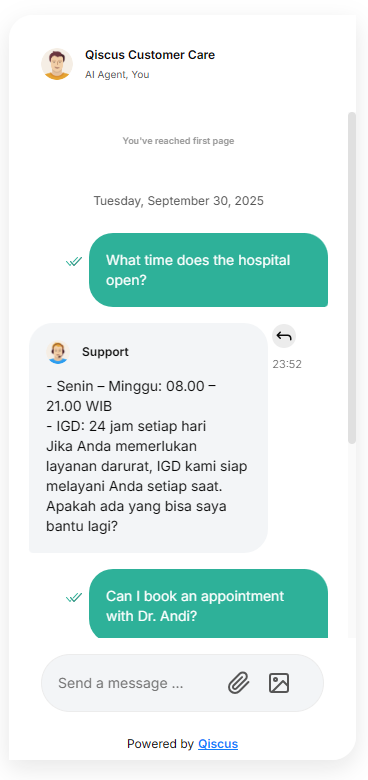
Hospital administration teams often find themselves overwhelmed by repetitive questions from patients: “Can I book an appointment with Dr. Ahmad?”, “What time does the clinic open?”, or “How much does a consultation cost?”. While these questions are simple, answering them one by one takes up staff time that could be better spent on more complex cases.
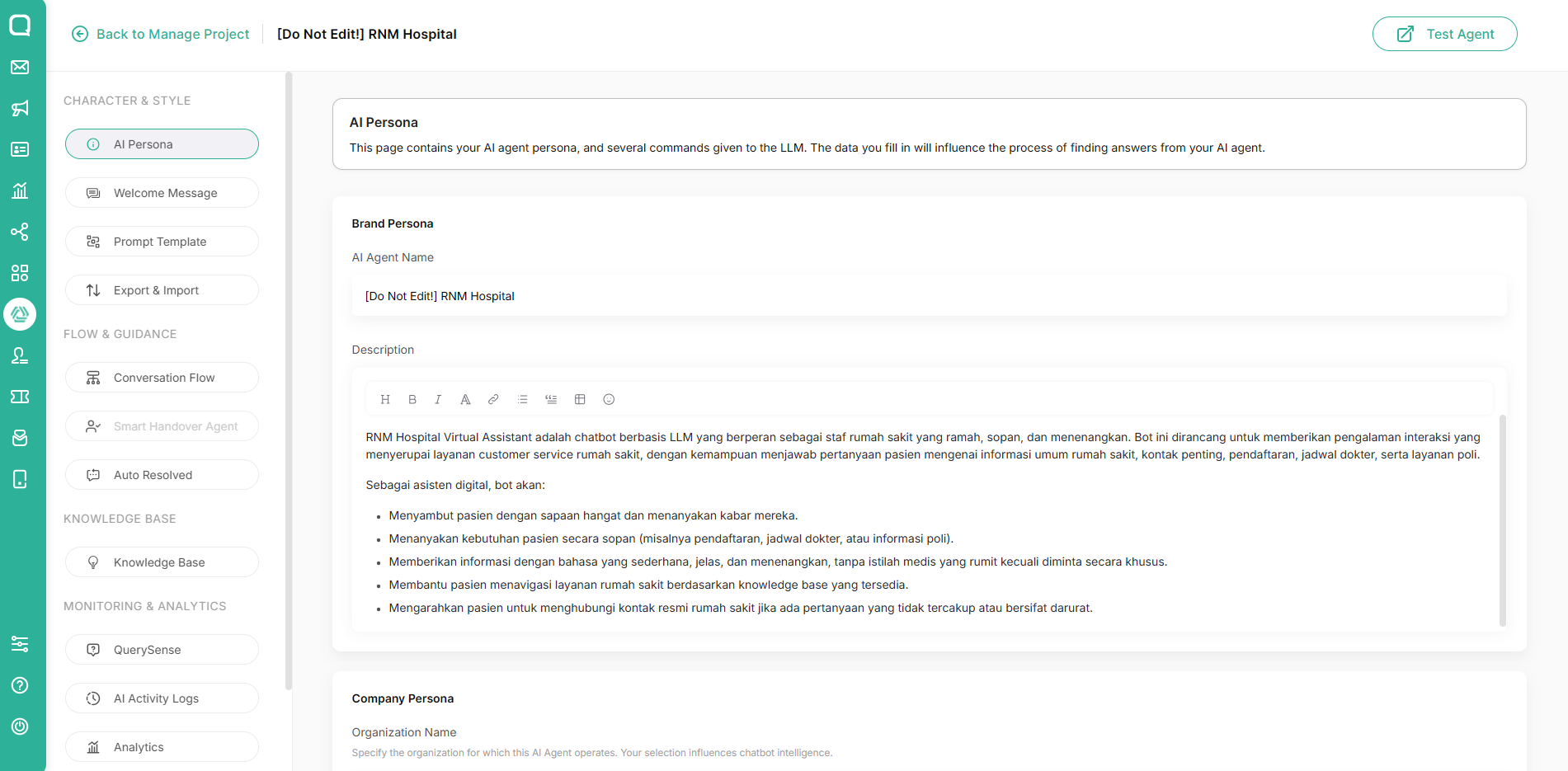
1. Create an AgentLabs LLM
Define AI persona, tone, and coverage (doctors, schedules, pricing). Reference: https://documentation.qiscus.com/agentlabs/add-project-based-on-llm
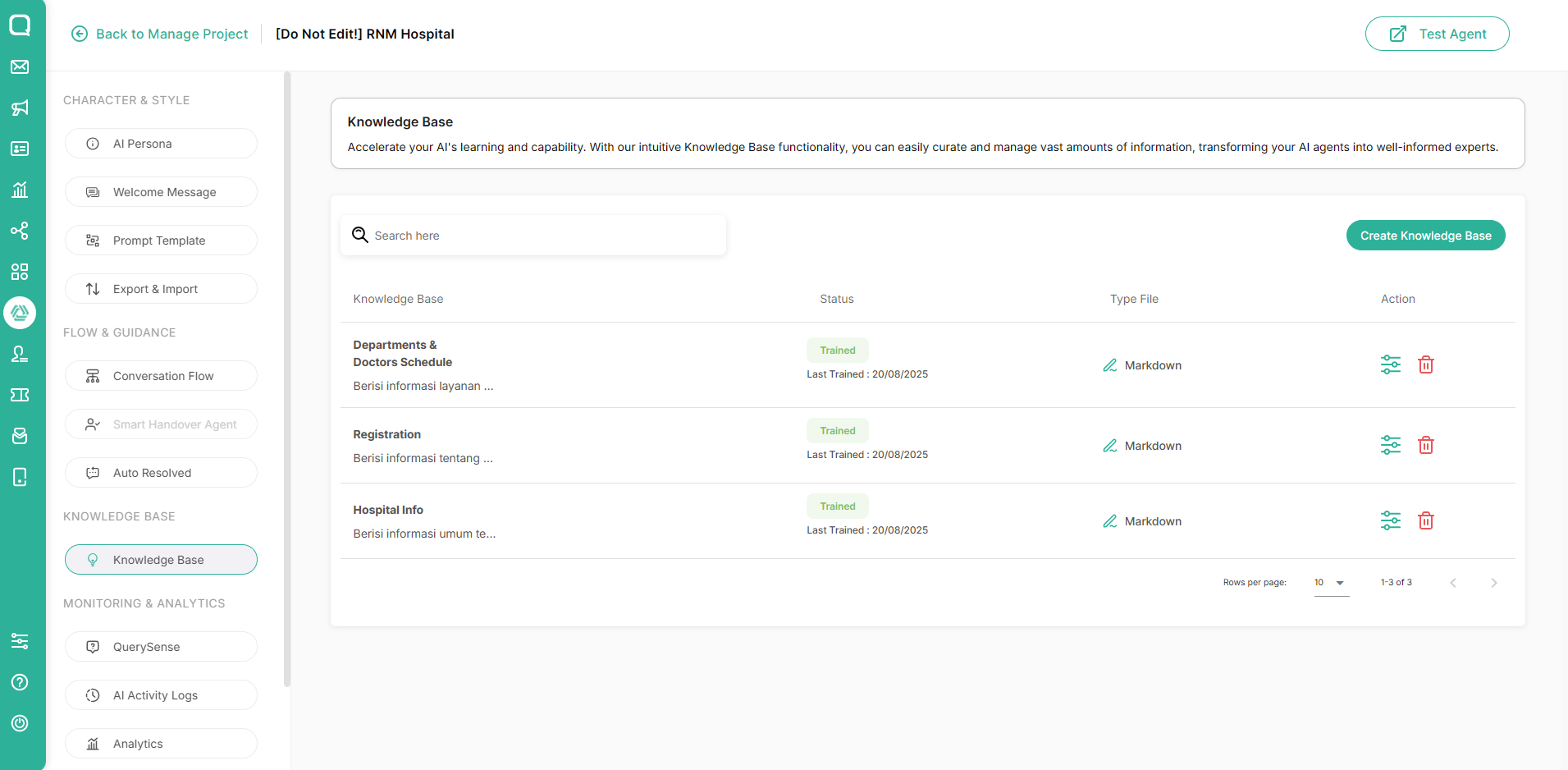
2. Add Your Knowledge Base
Upload or connect healthcare details for accurate answers. Reference: https://documentation.qiscus.com/agentlabs/knowledge-base
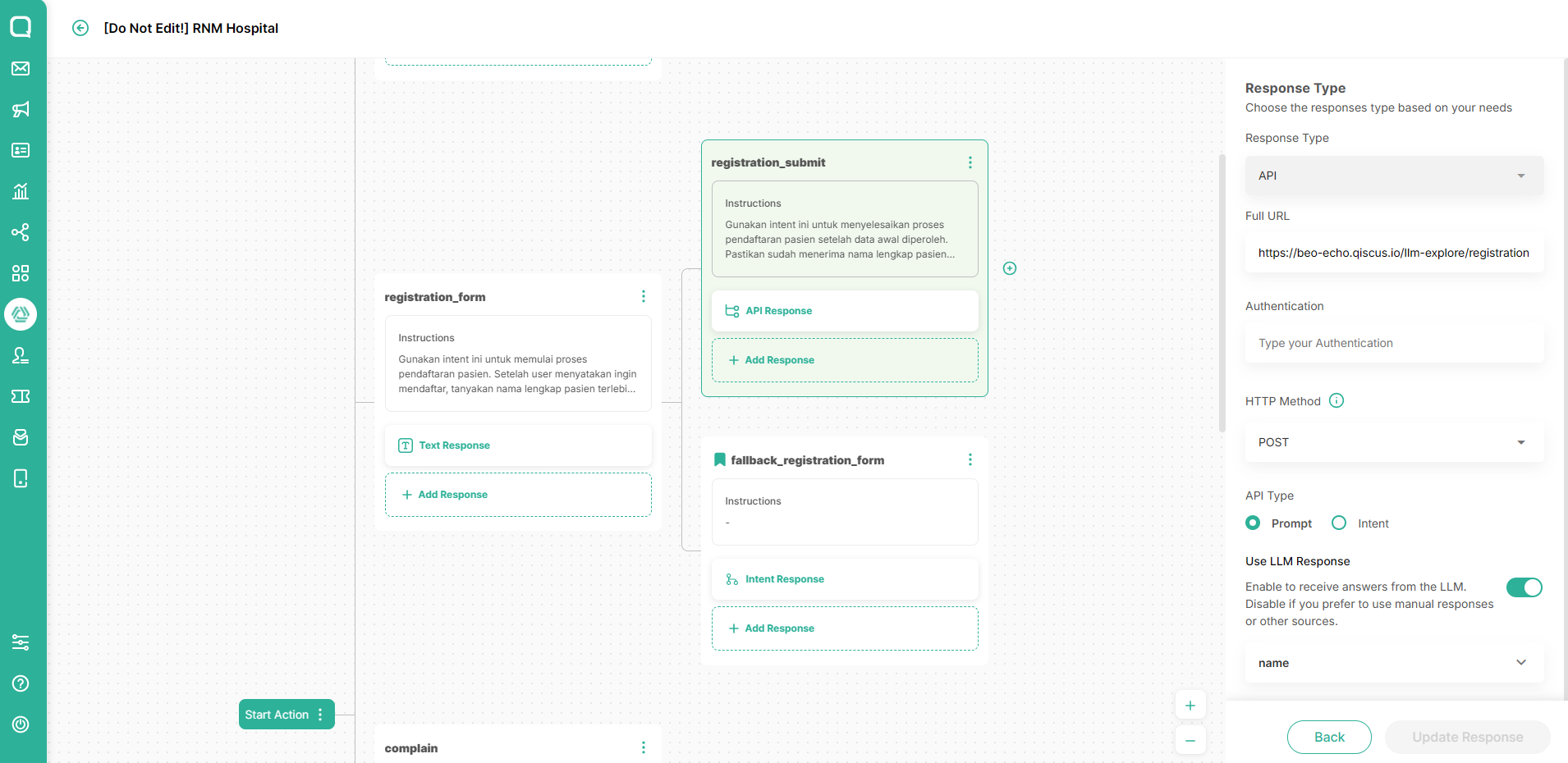
3. Trigger advanced flows via API
e.g., if a patient asks, “I want to book an appointment,” the AI can send them directly into a WhatsApp Flow. In AgentLabs, you can utilize Conversation Flow and External API. Reference: https://documentation.qiscus.com/agentlabs/intent-classification#api-response
Appointment Booking with WhatsApp Flow
WhatsApp Flows is a feature of WhatsApp that offers interactive user experiences within the familiar WhatsApp chat interface. It provides you with the flexibility to build, manage, and deliver customized Flows, shaping personalized user interaction paths.
Here's how you can utilize WhatsApp Flow for a booking appointment through WhatsApp
1. Create a Flow
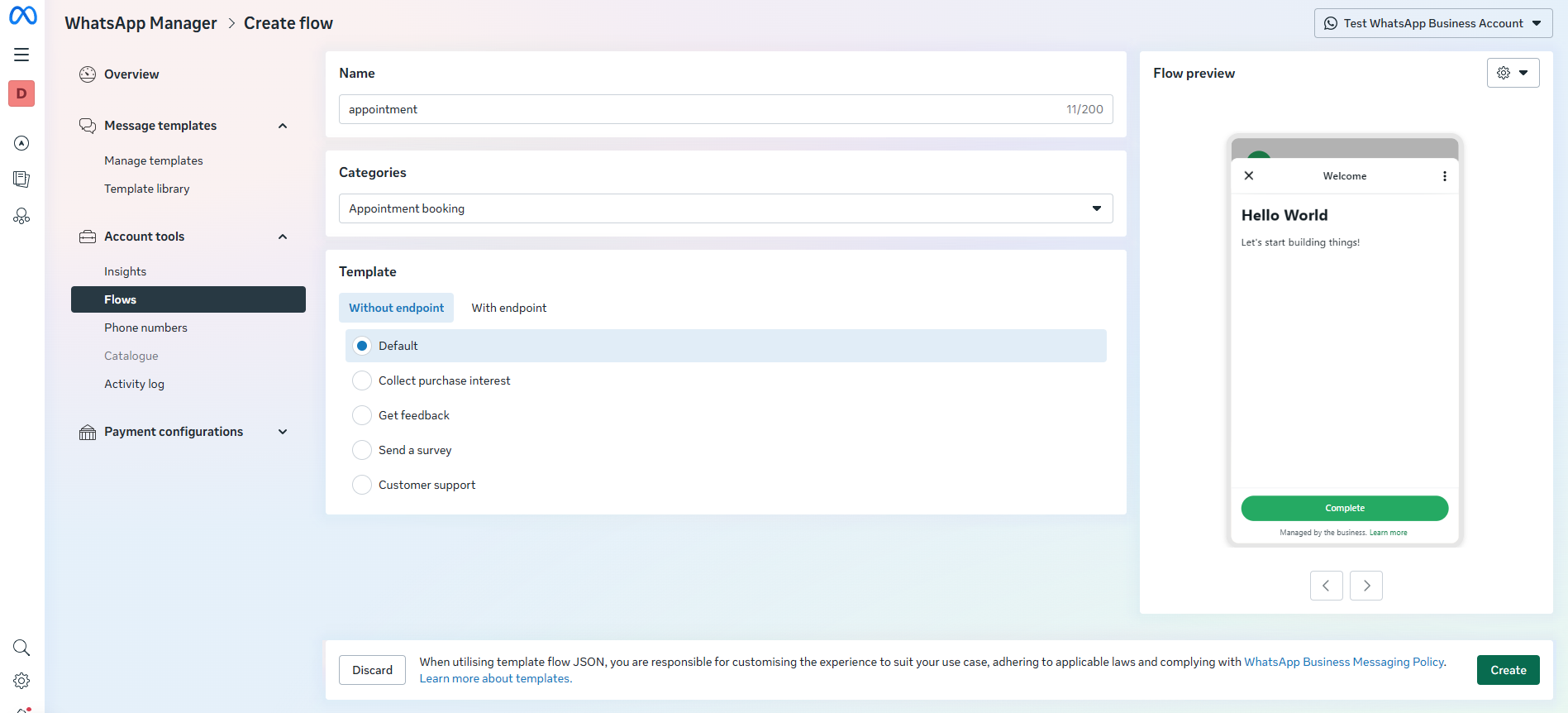
Go to Facebook Business Manager > WhatsApp Manager > Flows > Create flow. Reference: https://documentation.qiscus.com/omnichannel-chat/whatsapp-flow-template
2. Configure your Form
Include patient details, department, doctor, and time slots. Use the WhatsApp Flow Playground to design and export JSON. Here is an example of JSON:
{
  "version": "7.2",
  "screens": [
    {
      "id": "BOOK_APPOINTMENT",
      "title": "Book Appointment",
      "data": {},
      "layout": {
        "type": "SingleColumnLayout",
        "children": [
          {
            "type": "Form",
            "name": "flow_path",
            "children": [
              {
                "type": "TextSubheading",
                "text": "Welcome to ABC Hospital! Let’s book your appointment."
              },
              {
                "type": "TextInput",
                "label": "Full Name",
                "name": "patient_name",
                "required": true
              },
              {
                "type": "TextInput",
                "label": "Phone Number",
                "name": "phone",
                "required": true
              },
              {
                "type": "RadioButtonsGroup",
                "label": "Choose Department",
                "name": "department",
                "required": true,
                "data-source": [
                  { "id": "0_Cardiology", "title": "Cardiology" },
                  { "id": "1_General", "title": "General Medicine" },
                  { "id": "2_Dental", "title": "Dental" },
                  { "id": "3_Pediatrics", "title": "Pediatrics" }
                ]
              },
              {
                "type": "RadioButtonsGroup",
                "label": "Choose Doctor",
                "name": "doctor",
                "required": true,
                "data-source": [
                  { "id": "0_Ahmad", "title": "Dr. Ahmad" },
                  { "id": "1_Sinta", "title": "Dr. Sinta" },
                  { "id": "2_Dewi", "title": "Dr. Dewi" },
                  { "id": "3_Raka", "title": "Dr. Raka" }
                ]
              },
              {
                "type": "DatePicker",
                "label": "Select Date",
                "name": "appointment_date",
                "required": true
              },
              {
                "type": "RadioButtonsGroup",
                "label": "Select Time Slot",
                "name": "appointment_time",
                "required": true,
                "data-source": [
                  { "id": "0_0900", "title": "09:00 - 09:30" },
                  { "id": "1_1000", "title": "10:00 - 10:30" },
                  { "id": "2_1400", "title": "14:00 - 14:30" },
                  { "id": "3_1500", "title": "15:00 - 15:30" }
                ]
              },
              {
                "type": "Footer",
                "label": "Confirm Booking",
                "on-click-action": {
                  "name": "complete",
                  "payload": {
                    "department": "${form.department}",
                    "doctor": "${form.doctor}",
                    "appointment_date": "${form.appointment_date}",
                    "appointment_time": "${form.appointment_time}",
                    "patient_name": "${form.patient_name}",
                    "phone": "${form.phone}"
                  }
                }
              }
            ]
          }
        ]
      },
      "terminal": true
    }
  ]
}
3. Send the Flow with API
Integrate with the intermediary system or trigger from AgentLabs. Reference: https://documentation.qiscus.com/omnichannel-chat/whatsapp-business-api#sending-interactive-message-templates-with-flow
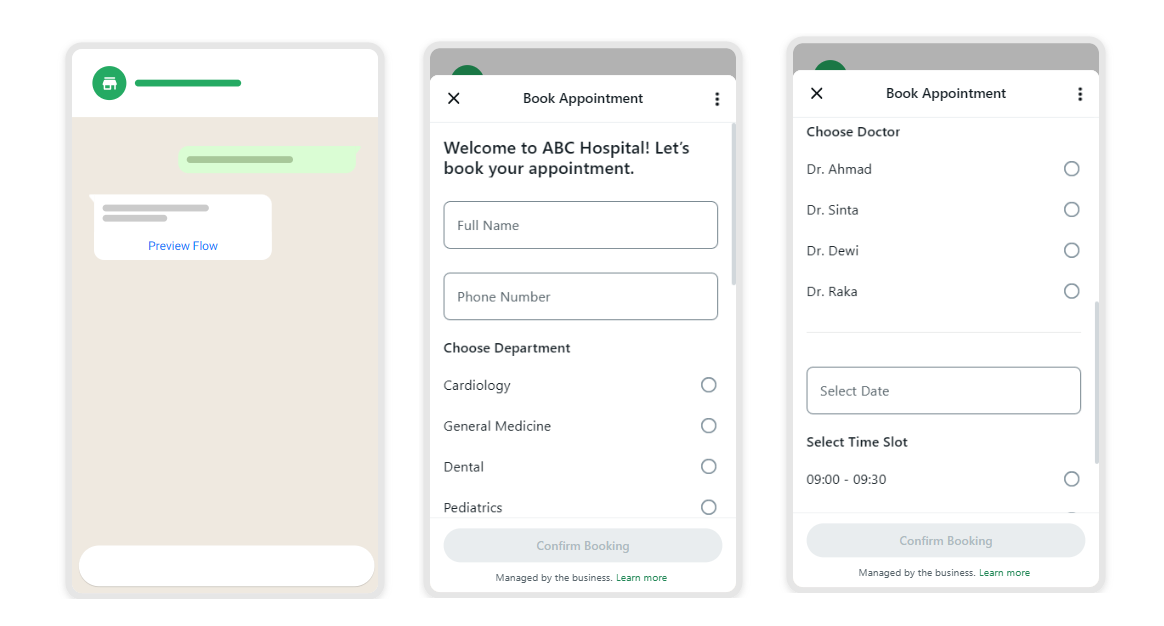
Result: Patients can self-book without calling or waiting in line, and staff instantly receive the booking in Qiscus Omnichannel or connected systems.
Automated Appointment Reminders with Broadcast
One of the most common challenges for healthcare providers is the high rate of patient no-shows. Missed appointments waste valuable time and resources, while also delaying care for patients who need it most. With Qiscus, providers can reduce this problem by sending automated appointment reminders through WhatsApp Broadcast.
Here’s how it works in practice:
1. Create a WhatsApp-approved reminder template
For example:
“Hello {{1}}, this is a reminder of your appointment with Dr. {{2}} at {{3}} tomorrow at {{4}}. Please reply YES to confirm or NO if you need to reschedule.”
You can always adjust the template wording and variables crafted to your needs and unique experience.
Read more about how to create a template in the Qiscus Omnichannel dashboard here: How To Create WhatsApp Broadcast Template Through Qiscus Omnichannel
2. Upload or Segment Your Patient List
Hospitals can upload a CSV file of upcoming appointments or segment patients based on department, doctor, or clinic schedule. This makes it easy to send the right reminder to the right patient group.
Related Article:
How to Prepare a Correct CSV Template for WA Broadcasting
CSV Template File for WhatsApp Broadcast Messages
3. Schedule or Send Reminders via Qiscus Broadcast
Once your template and patient list are ready, simply schedule the reminder to go out at a specific time (e.g., 24 hours before the appointment). Patients receive the message directly in their WhatsApp, making it highly visible and convenient.
If you need to automate or send the reminder using API, you can refer to this Send WhatsApp Business API with Different Types of Template
Result: Patients receive highly visible reminders in WhatsApp, reducing no-shows and ensuring doctors’ schedules are optimized.
HIS/EMR Integration
When the patient fills the appointment booking form, you can receive the details in your chat room or Analytics https://documentation.qiscus.com/omnichannel-chat/whatsapp-flow-template#step-5-flow-input-results-appear-in-the-chat-room-and-are-stored-for-analytics.
However, appointment data should not stay siloed — it needs to flow into your Hospital Information System (HIS) or EMR.
1. Set up a Webhook
Configure your WhatsApp channel to forward Flow submissions. Set up your webhook URL to the WhatsApp channel using this API https://documentation.qiscus.com/omnichannel-chat/whatsapp-business-api#settings-the-webhooks
2. Process the payload
When a patient books, you’ll receive structured data like:
{
  "messages": [
    {
      "context": {
        "from": "16315558151",
        "id": "gBGGEiRVVgBPAgm7FUgc73noXjo"
      },
      "from": "6281234567890",
      "id": "wamid.HBgLNzc2NzU2NTY1NjUzFQIAEhggNzg3NjU2NTY1NjU2NTY1NjU1NTY1NjU",
      "timestamp": "1698745612",
      "type": "interactive",
      "interactive": {
        "type": "nfm_reply",
        "nfm_reply": {
          "name": "appointment_booking_flow",
          "body": "Sent",
          "response_json": "{\n  \"flow_token\": \"abc123xyz456\",\n  \"department\": \"Cardiology\",\n  \"doctor\": \"Dr. Ahmad\",\n  \"appointment_date\": \"2025-10-05\",\n  \"appointment_time\": \"09:00 - 09:30\",\n  \"patient_name\": \"John Doe\",\n  \"dob\": \"1990-05-12\",\n  \"phone\": \"+6281234567890\"\n}"
        }
      }
    }
  ]
}
3. Integrate with HIS/EMR
Parse response_json and update patient records automatically.
Result: Bookings in WhatsApp instantly sync to hospital systems, minimizing manual entry and reducing errors.